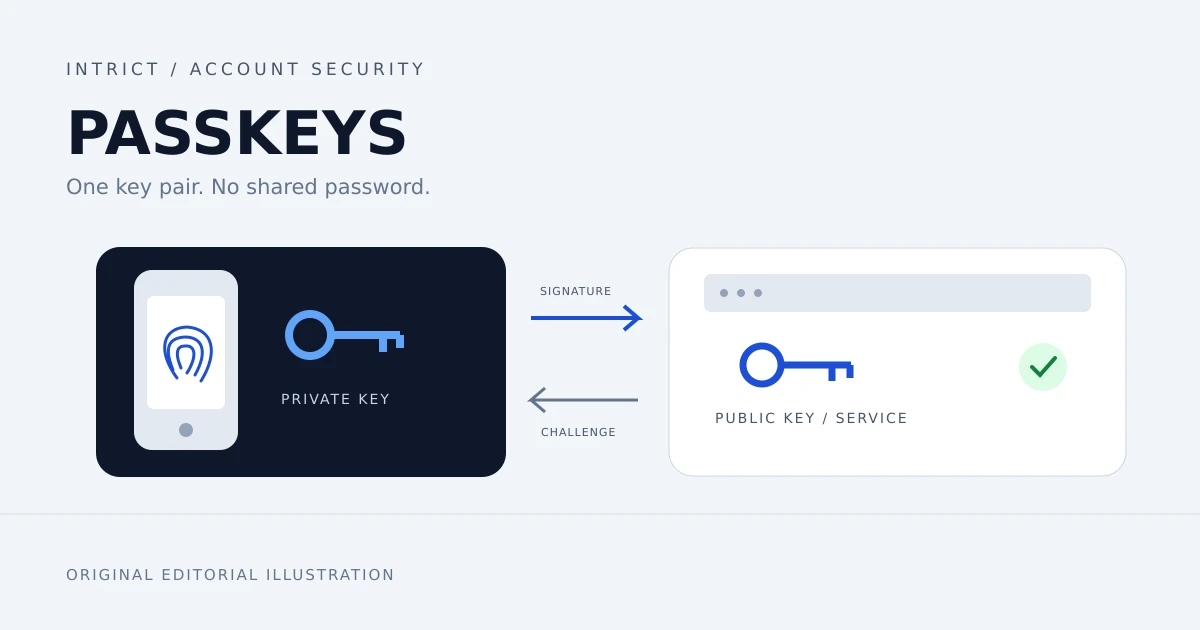
In brief: Passkeys can replace passwords and resist phishing during sign-in. For a Belgian freelancer or SME, the key decision is not just switching them on. It is also deciding who controls access, where credentials are stored and how an account can be recovered.
This is a practical evergreen analysis, not an announcement of a new legal requirement. Sources were checked on 11 October 2026.
Why this matters for your website
Your website is more than the pages customers see. Behind it sit domain registration, hosting, email and possibly an administration portal. Someone who gains access to those accounts can disrupt your digital operations. Secure sign-in is therefore part of website maintenance, not just a concern for large IT departments.
Passkeys are one useful building block. The FIDO Alliance describes them as credentials based on cryptographic keys. You approve a sign-in using a fingerprint, facial recognition or a device PIN, for example. You do not type a reusable account password into the website.
What makes a passkey different?
A passkey uses a key pair. The service stores the public key, while your device, passkey provider or security key manages the private key. The website verifies a cryptographic response instead of checking a shared password.
The credential is tied to the legitimate service. A fake website cannot simply use the same passkey. This is why FIDO calls passkeys phishing-resistant. Your fingerprint or face is checked locally; the website does not receive your biometric data.
This does not make your account invulnerable. An insecure device, a stolen active session or a weak recovery process still matters. If the service also accepts a password, that alternative entry point remains. Passkeys improve authentication; they do not replace an entire security policy.
Passkeys are not the same as two-step verification
Safeonweb, an initiative of Belgium's Centre for Cybersecurity, explains why adding another factor improves protection over a password alone. Enable available two-step verification even where a service does not yet support passkeys.
However, a password followed by a one-time code is not equivalent to a phishing-resistant passkey. A fraudulent website can also ask you for that code. The cryptographic connection to the legitimate service is the important additional protection with passkeys. Do not blindly disable existing safeguards: check what the provider supports and what verification your account requires.
Synced or device-bound: which fits your business?
The FIDO enterprise guide describes two important forms.
- Synced passkeys become available on your linked devices through a passkey provider. This can be convenient if you use both a laptop and a phone. Secure the provider account too, and understand its recovery process.
- Device-bound passkeys remain on a specific authenticator, such as a physical security key. You can use that key with several computers, but its passkey is not automatically copied to a second key. Register a separate backup key where the service allows it.
Synchronisation can make everyday accounts easier to use. More tightly controlled hardware may suit sensitive administrator accounts. This is a decision based on risk and provider capabilities, not a universal requirement for every Belgian SME.
Start with one account, not the whole business
A manageable pilot looks like this:
- Create an inventory. List business email, domain management, hosting and website administration. Record ownership and who can perform recovery. Do not put secrets in this list.
- Check support. Look for passkeys or security keys in the official account settings. A fingerprint sensor on your laptop does not mean every service supports passkeys.
- Choose controlled storage. Avoid making your only business access depend on an employee's personal account. Agree on device ownership, provider accounts and what happens when someone leaves.
- Register and test. Add a passkey to one account and check sign-in on the devices you actually use. Keep a controlled recovery route until the test succeeds.
- Check recovery without discarding access. Verify that a second registered key works and that recovery codes are stored securely. Do not delete your only passkey to simulate losing a phone.
- Document the outcome. Record what works, who provides support and how access is revoked when someone leaves. Expand the rollout only afterwards.
These steps are editorial recommendations, not promises about a particular provider's features or licence requirements.
Should you add passkeys to a customer portal?
Only if your website genuinely needs accounts. An informational website with a contact form does not need customer logins simply to look modern.
If you do have a portal, discuss WebAuthn support, registration, recovery, accessibility and alternatives for customers without a suitable device with your developer. FIDO identifies WebAuthn as the browser API used for passkeys. Adding a button alone is not a complete implementation: the server and the account lifecycle need to be designed correctly too.
Frequently asked questions
Do I need a fingerprint reader?
No. Depending on the device and service, a PIN or a security key can also be used. Check which combinations your provider supports.
What happens if I lose my phone?
It depends on how your passkey is stored. With synchronisation, recovery through the passkey provider may be possible. For a device-bound credential, you need another registered key or the service's recovery process. Arrange this before a device is lost.
Can I remove every password immediately?
Not automatically. Some services retain passwords or other recovery methods. Check support, recovery and policy first. Where passwords remain necessary, use strong unique passwords and available two-step verification.
Do passkeys guarantee GDPR or NIS2 compliance?
No. Stronger authentication is one measure. Whether regulations apply, and whether you comply, depends on your organisation and other controls. This article is not legal advice.
A sensible next step
Start this week with an overview of access to your domain, email and website. Want to discuss how access management fits into website maintenance or a new portal? Contact IntrICT. We can discuss your situation without assuming that a full migration is needed.
Sources